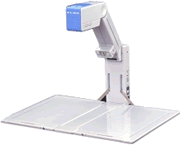
엘모의 고화질 프리젠테이션 카메라 입니다.
B5 사이즈로 접힐 수 있고 1024x768 해상도의 고해상도 영상을 볼 수 있습니다.
특 징
- 모바일 시대의 NEW 스타일, 경량 컴팩트 설계.
- 고화소·고정밀의 85만 화소 프로그래시브 카메라를 탑재.
- 고해상도 XGA 대응, 아날로그 RGB 출력.
- 포커스 프리(FOCUSFREE)로 핀트 맞댐 불요.
- 확대, 강조, 확인 포인트를 전자 줌 업.
- 아날로그 RGB 입력 단자·스위처 기능.
<희망 소매 가격 가격> \1,980,000
Big 14.3 x 10.7" scanning area folds into compact notebook size. Easy Plug and Play connections to PC and LCD / DLP projector. True XGA (1024 x 768) capture and output resolution. Progressive scan at 20 fps for virtual real- time viewing ease. RGB PC connection for seamless laptop presentation switching. Unique wide depth of field optical system for continuous focus 4x electronic macro zoom, auto white balance and exposure
3 lbs, 2.3 x11.1 x6.3" compact carry size
사 양
촬영 렌즈 F:2.9 f=3mm
촬영 영역 [최대]옆:364mm 세로:271mm [최소]옆:179mm 세로:135mm
촬상 소자 프로그래시브 정방 화소1/3인치 칼라CCD
촬상 속도 20프레임/초
총획 소수 수평1077 수직788 85만화소
유효 화소수 수평1024 수직768
해상도 수평600TV본이상 수직600TV본이상
동기 신호 주파수 수평:48.363kHz 수직:60.004Hz
출력 신호 아날로그RGB
1024X768@60Hz VESA준거
화이트 밸런스 풀 오토/고정
감마 보정 유 (3포지션 스윗치 전환)
게인 조정 유 (UP/DOWNN 푸쉬 스윗치)
외부 입력 전환 유 (본체 카메라/외부 스윗치 전환)
외부 입력 단자 D-sub15핀 (아날로그RGB신호)X1
출력 단자 D-sub15핀 (아날로그RGB신호)X1
전원 DC12V 소비 전력 9VA
외형 치수 [사용시]폭361mm 안길이282mm 높이161~284mm 질량 1.5kg
|
Elmo HV-100XG XGA Visual Presenter
|
High-Resolution Mobile Presenter
Elmo's new HV-100XG High-Resolution Mobile Presenter has an analog RGB output that connects directly to a data projector for True-XGA live presentations.
Elmo HV-100XG Specifications at a Glance
| Weight |
Resolution |
Zoom |
Cameras |
|
| 3.3 lbs |
XGA |
4X |
One |
| |

Download a Spec Sheet
PDF Format
|
|
This model has been discontinued from Anchor
This page is for reference only, please refer to the Elmo Page for current models.
|
Features Include
The HV-100XG visual presenter gives you true XGA (1024 x 768) RGB resolution and more than 600 x 600 TV lines of resolution. You'll enjoy features such as real-time viewing at 20 frames/second, an adjustable camera arm for image sizing, up to four times digital macro-zoom, a built-in lighting unit and built in analog RGB switcher. Plus, no focus or iris adjustment is needed.
- Big 14.3 x 10.7" scanning area folds into compact notebook size
- Easy Plug and Play connections to PC and LCD / DLP projector
- True XGA (1024 x 768) capture and output resolution
- Progressive scan at 20 fps for virtual real- time viewing ease
- RGB PC connection for seamless laptop presentation switching
- Unique wide depth of field optical system for continuous focus
- 4x electronic macro zoom, auto white balance and exposure
- 3 lbs, 2.3 x11.1 x6.3" compact carry size
Specifications:
AES: Built-in
Anolog RGB Output: XGA (1024 x 768 @ 60Hz)
Auto White Balance: Built-in
Dimensions:
Set-up 361(W) X 282(D) x 161-284(H)mm
14.2" X 11.1" X 6.3-11.2"
Folded 59(W) X 282(D) X 161(H)mm
2.3" X 11.1" X 6.3"
Digital Zoom: 1 - 4X
Effective Picture Element: 1024(H) x 768(V)
Focusing: Not necessary (FOCUS FREE)
Gamma Selection: Built-in (3position)
Image pick-up Element: 1/3" progressive scan CCD
Image Transfer Speed: 20 Frames/sec.
Input Selection: Internal/RGBX1
Iris: Fixed
Lens: F2.9, f=3mm
Lighting Unit: Built-in (white LED)
Power Source: DC 12V (AC adaptor is supplied)
Resolution: More than 600(H) x 600(V) TV lines
RGB Output: mini D-sub 15 Pin
Shooting Area: 14.3"X10.7" - 7.0"X5.3" (364X271mm - 179X135mm)
Sync. System: Internal
Weight: 3.3lbs (1.5kgs)
|
|
Using the Elmo HV-110XG and the EV-200 Series Document Cameras
The Elmo HV-110 is a very portable document camera designed for ease of use and durability. To use this document camera follow these steps:
- Unfold the document camera and place it on a flat surface and plug in the power plug to a wall outlet and to the back of the camera unit.
- Using the provided cord hook the document camera up to an appropriate viewing device such as a TV or VCR for the EV-200 model or to a projector or computer monitor for the HV-100XG model. Be sure that you plug the cord into the Video out terminal on the Elmo and into the Video in terminal on the viewing device. Below is a diagram of the terminals on the back of the both models:
HV-110XG: EV-200:
 
- Power on the document camera by moving the power switch to the on position. The switch is located on the side of the base unit.

- Just above the power switch, ensure that the INPUT switch is in the "Main" position.
- Place the object that you want to display under the camera and adjust the picture as follows:
- Adjust the brightness of the image by using the Gain up and down buttons on the side of the camera (see image below) or by toggling the lamp switch located just above the input and power switches on the side of the base unit.
- Zoom the image by using the digital zoom buttons on top of the camera (see image below) or by moving the camera arm closer to the displayed object.

- Both models have video pass-through capabilities that make it easy to switch from the document camera to another video device. The HV-110XG allows switching between the document camera and a computer input, and the EV-100 allows switching between the document camera and a composite video device such as a DVD or VCR unit. Follow these steps to use this feature:
- Hook the alternate video device to the Video/RGB IN terminal on the side of the main unit
- To Toggle between the alternate video device and the document camera use the "Input" switch on the side of the document camera's base unit.
| |





